
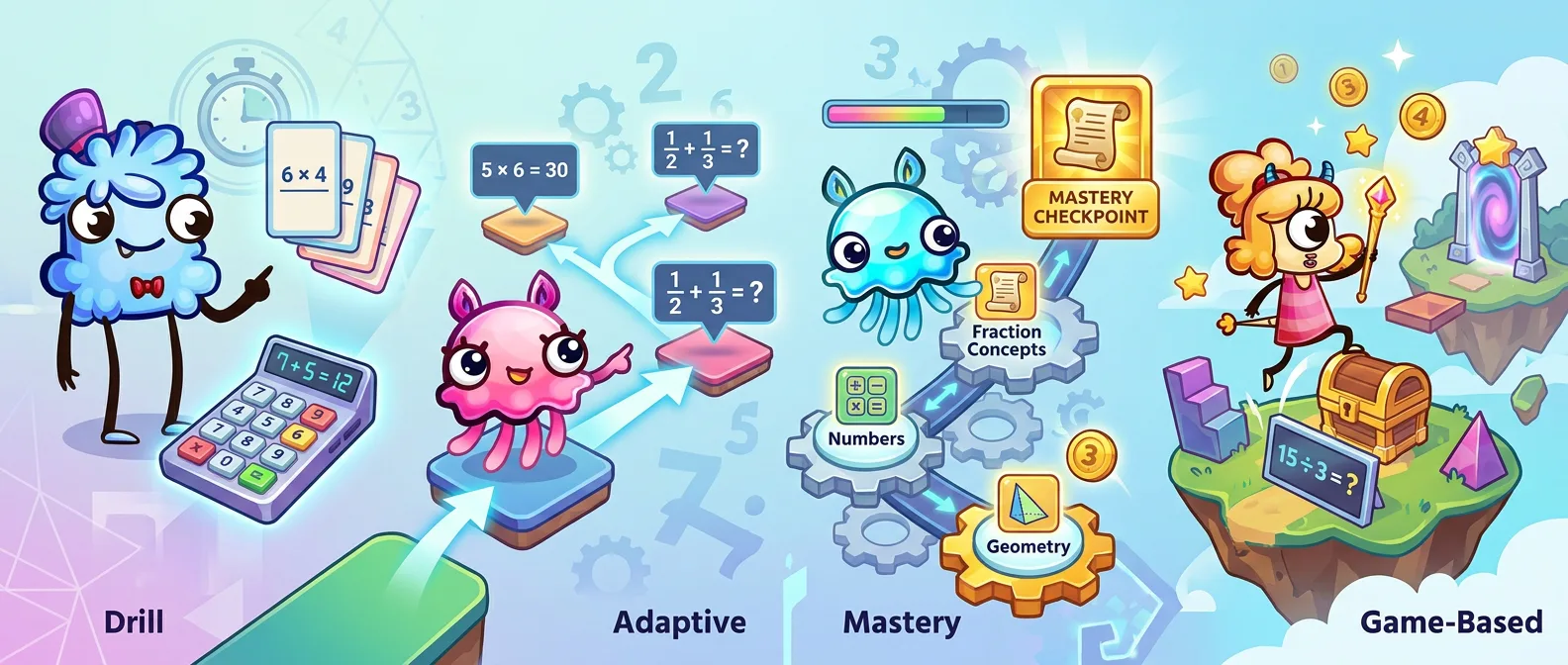
Four main types of math apps show up when you compare math apps for a child aged 5 to 10. Drill (fast recall of math facts, like XtraMath). Adaptive (problem sets that shift with the child, like Prodigy Math). Mastery or curriculum (a full learning path, like Khan Academy). Game-based (play is the practice, like MathHero). Each type was built for a different goal. Pick the one that matches what you want to fix, not the loudest marketing.
Four types of math apps you'll actually compare
Ask for a math app and ten names come back in search results. They look interchangeable. They are not.
Nearly every math app for your age range falls into one of four buckets. Drill. Adaptive. Mastery. Game-based. Each highlights a different approach to math practice. A drill app looks like a stopwatch. A story-driven math app looks like a cartoon.
Pick the right bucket and the shortlist of best math apps will write itself.
Below: what each type does, who it fits, one well-known example, and the honest limitation. Lens: kids aged 5 to 10, early elementary math skills (addition, subtraction, multiplication, and division). Older kids and high school students get a quick mention at the end.
Drill math apps: speed and recall
Let's look at who drill apps work best for and where they fall short.
What a drill math app does
A drill math app runs the same kind of task over and over. Single-digit addition, times tables, division facts. Short sessions, five to ten minutes. The child answers, the app marks it, next problem. The feedback loop is immediate. Correct answers are logged, wrong ones come back.
The goal is math fluency, meaning the child answers a basic fact without stopping to work it out. NCTM calls this procedural fluency, and the National Research Council's Adding It Up names it one of five strands of mathematical proficiency, alongside conceptual understanding.
Who it fits best
A child who already understands what a math fact means but is slow pulling it from memory. A kid who freezes on 7 × 8 for ten seconds. A kid whose teacher just said the class is behind on multiplication facts.
If your child does not yet know what multiplying is, a drill app will not teach them. Fluency comes after understanding, not instead of it.
Example: XtraMath
XtraMath is the classic. A 501(c)(3) nonprofit, free in its basic form, used in schools across the US. The pitch: ten minutes a day on addition, subtraction, multiplication, and division facts. The interface is almost deliberately plain. A problem, a keypad, a timer. No story, no reward loop, no music.
That bareness can be a feature for some kids, a wall for others.
Where drill falls short
Motivation. A drill app assumes the child will show up because they have to. Works for a short burst, or in class with a teacher behind it. Struggles at home across weeks. Drill is also quite narrow: it builds speed on facts the child already understands, not deeper understanding of what those facts mean.
Adaptive math apps: the problem set that moves with your child
Here's where adaptive apps work best and what to watch out for.
What an adaptive math app does
An adaptive math app changes what the child sees based on how they answer. Get it right fast, and the next one gets harder. Miss three in a row, and the app backs off, reteaches the skill, or serves up an easier one. Over weeks, it builds a picture of what the child knows and where the learning gaps are.
Adaptive is a behavior, not a visual style. An adaptive app can look like a game, a worksheet, or a dashboard. The engine underneath is what makes it adaptive, not the art on top.
Who it fits best
A parent who wants the app to figure out the right difficulty without you watching every session. A child whose level is unclear (switched schools, missed a term). A child who moves through topics at their own pace.
Example: Prodigy Math
Prodigy Math dresses adaptive practice in a wizard-and-monsters RPG for grades 1 to 8. Battles are powered by math problems, and the problems shift with the child's performance. The core game is free; a paid Membership adds extra game content and avatar items. By Prodigy's own count, more than 6 million students answered over 840 million math questions during the 2025/26 school year as their schools competed for its National Cup, the scale this category has reached in schools.
Where adaptive falls short
Parent control. If the app decides what the child sees, you have less say in whether this week's session hits the times tables they need. Some adaptive apps also lean more on the game wrapper than the math underneath, so the child grinds through battles with easy problems and feels productive without making real progress in math.
Mastery and curriculum apps: a full learning path
Here's who these apps suit best and where they can fall short.
What a mastery math app does
A mastery or curriculum app walks the child through a sequence. Short explanation or video, a few practice problems, immediate feedback, then move on to the next skill once a bar is cleared. The math learning path is laid out in advance and aligned to grade level standards.
This is the closest thing to a math learning center on your tablet. Study plan, progress reports, a map of what comes next.
Who it fits best
A child catching up on topics they missed. A homeschooler who needs a spine for the year. A parent who wants a visible, grade-aligned path instead of random math practice. A mastery app like Khan Academy also reaches middle and high-school students, so one account covers a long stretch of learning math.
Example: Khan Academy and Khan Academy Kids
Khan Academy is probably the best-known free math app in this category. Short instructional videos, interactive exercises, a mastery bar on every skill, and coverage from kindergarten math through calculus. It is run by a 501(c)(3) nonprofit, so every lesson and exercise is free, with no ads. The one paid extra is Khanmigo, an optional AI tutor for learners and parents. For younger children, there's Khan Academy Kids, a separate free app for ages 2 to 8 covering early math, reading, and social skills.
Where mastery falls short
Mastery apps work hardest for a motivated child, or a child sitting next to a parent. The video-plus-exercise format is faithful to real teaching, and it can feel like school. For a 6-year-old who already dreads math, pressing play on a lesson video is still pressing play on a lesson video. There is no story to pull them in.
Game-based math apps: play is the point
Let's see when play makes math click, and when it doesn't.
What a game-based math app does
This fourth type flips the frame. A child opens the app to play. The math practice happens because math is how the game progresses. Solve a round of addition to beat a level, earn coins for an outfit, rescue a character by answering a set of division problems. The math is the gameplay, not a tax paid before the fun.
The best examples in this category treat story and characters as the engine of motivation, and the math as the action verb. The weakest ones slap a cartoon on top of a worksheet. Big difference.
Who it fits best
A child who already resists math. A kid who needs practice but will not do it as practice. A home where "do your math" is a daily argument you want to end.
Of the four main types, this one also fits a younger child who learns better through immersion than instruction. It's often the right call for children aged 5 to 8 who are building fluency in addition and subtraction but would not choose to open a drill app. If your child shows signs of math anxiety, our guide on helping a child who struggles with math covers how to pick a starting point that does not make it worse.
Example: MathHero
MathHero is a story-driven game for kids ages 5 to 10. The child plays through an adventure, and the way to progress is to solve short sets of math problems. Addition within 10, 20, 100 and 1000. Subtraction. Multiplication facts (times tables). Division. No video lessons. The scope is the core elementary math path, start to mastery, inside a real game.
Parents also get fine control over the practice: you pick the exact topic, the difficulty, the answer format (typed or multiple choice) and how fast the monsters approach. Each kid gets their own profile with its own settings.
MathHero is free to play with no ads: you can complete the whole game without paying, with five levels available per day. A subscription (with a free trial) removes the daily cap. The three learning tracks, from first addition to times tables and division, and the full feature list are on the MathHero product page.
Where game-based falls short
Breadth. A story-driven math app that goes deep on core elementary math will not teach geometry, fractions, or algebra. If the child needs those, back to the mastery or curriculum type.
Second honest limitation: a very young 5-year-old might find the pace too much. Watch the first few sessions before deciding.
Want to see the game-based type in action? MathHero is free to play at five levels a day.
Explore MathHeroThree more types of math apps on the edges
Four categories cover most of what parents of 5 to 10-year-olds will compare. Three more sit on the edges, worth naming so you know when to ignore them.
Solver apps (Photomath style)
A solver app lets a student point a camera at a problem and get a step-by-step solution. Photomath is the best known. Built for middle and high-school students stuck on homework, not for a 7-year-old doing times tables. If your kid is in grade 4 or below, skip this category. For older kids using one for math help, pair it with real learning resources so the step-by-step solution becomes a lesson, not a shortcut.
Graphing calculators (Desmos)
Graphing calculators turn equations into plot points and interactive graphs. Desmos is the leader and is a free app. Starts around middle school with algebra and covers tougher topics a kid moves through high school. Not relevant to K to 4 math classes. Bookmark for later.
Early-learning math apps (Pre-K and K)
Before a child is ready to solve their first addition problems, they need number recognition, counting, and basic concepts of more and less. Khan Academy Kids covers this. So does Moose Math. A different purpose from the four main types above. If your child is still learning what "3" looks like, start here, then move to the four main types once first addition clicks. For a better sense of what kids learn in kindergarten math, see our guide on what math a 5-year-old should know.
How to pick the right math app for your child
A few simple checks can help you narrow down your options and find an app that fits your child.
Start with the goal, not the app
The right question is not "What is the best math app?" It is "What are you actually trying to fix?"
- Facts are slow: a drill, or a story-driven app with a strong fluency loop.
- Level is unclear: adaptive, or mastery with a placement step.
- A full year to cover: mastery, maybe plus one of the others.
- A child who refuses math practice: game-based, every time.
- Math anxiety and dropping confidence: story-driven first, then add structure once the child is back on board.
One honest question for all math apps
Will you have to push the child to open the app, or will the child ask to play?
That is the test that decides whether the app will still be in use six weeks from now. Everything else is marketing.
Age and current math skills
Pick an app that matches your child's current math skills. An app that starts at times tables is wrong for a child doing first addition. A Pre-K app is wrong for a child who has finished kindergarten math.
Check the app's recommended age range and the skills it covers, but don't rely on the store listing alone. Open the app and watch a session before you commit.
Free vs paid
Most apps named here have a real free version. XtraMath is free from a nonprofit. Khan Academy's lessons and exercises are all free (its AI tutor, Khanmigo, is a paid extra). Prodigy Math is free to play, with a paid Membership for extra game items. MathHero is free at five levels per day; a subscription removes the daily cap. A math app with a solid free tier is a good place to start before you pay.
A free math app with no limit often means ads, or a paywall three screens in. Read the small print.
Can you mix two math apps?
Yes, and often you should.
A common pairing for a 7-year-old: a story-driven math app for daily motivation plus a mastery app on the side when a topic needs extra math help. Another: a drill in the morning and a story app in the evening. The key: don't stack three math apps. Two math apps the child uses beat five sitting on the home screen.
For specific picks instead of categories, our best math apps for kids roundup covers ages, pricing, and what each one is good at, and there are grade-by-grade lists for 1st and 2nd graders. For the practice habit itself, the best ways to learn math covers what works beyond the app choice.
Common questions
Pick the type of math app that fits what you need to fix. Then let the kid play.
This article is based on publicly available information and is intended for general informational and comparison purposes only. App features, learning content, and age recommendations may change over time. Pricing and availability may vary by plan, platform, and region. Please check the respective providers' websites for the latest information before choosing an app for your child. Third-party apps, products, and trademarks are mentioned solely for comparison purposes and do not imply affiliation or endorsement.
Sources
- National Council of Teachers of Mathematics. Procedural Fluency in Mathematics (position statement, 2023).
- National Research Council (2001). Adding It Up: Helping Children Learn Mathematics. National Academies Press.
- XtraMath. Plans and pricing.
- Prodigy Education. Math Memberships.
- Prodigy Education (2026). Meet America's math legends: the winning schools of the 2026 Prodigy National Cup.
- Khan Academy. Khanmigo pricing.
- Khan Academy. Khan Academy Kids.
